
Learning how to compare legal contracts properly is the highest-leverage habit in the deal cycle, because it's where you catch what changed, what was never agreed, and what quietly got worse while you were focused on price and timeline.
Part of why it gets skipped is that comparison looks simple at first glance. You see a change bar, a few marks on it, and none of them are alarming. However, this doesn’t show what was edited with track changes switched off or rewritten in a clean copy someone resent.
This guide covers how to compare legal contracts before you sign in a way that actually catches differences, what deal terms are worth checking on substance, and where software stops being enough.
What does comparing contracts actually mean?
Comparing contracts means checking a document against a reference point to find what changed, what's missing, and what's worse than it should be. The reference point is what founders often get wrong.
Most people assume it means running a redline against the last draft. However, this doesn't catch a clause that has been quietly unfavorable since version one, and it doesn't catch a term that was agreed on a call and never made it onto the page.
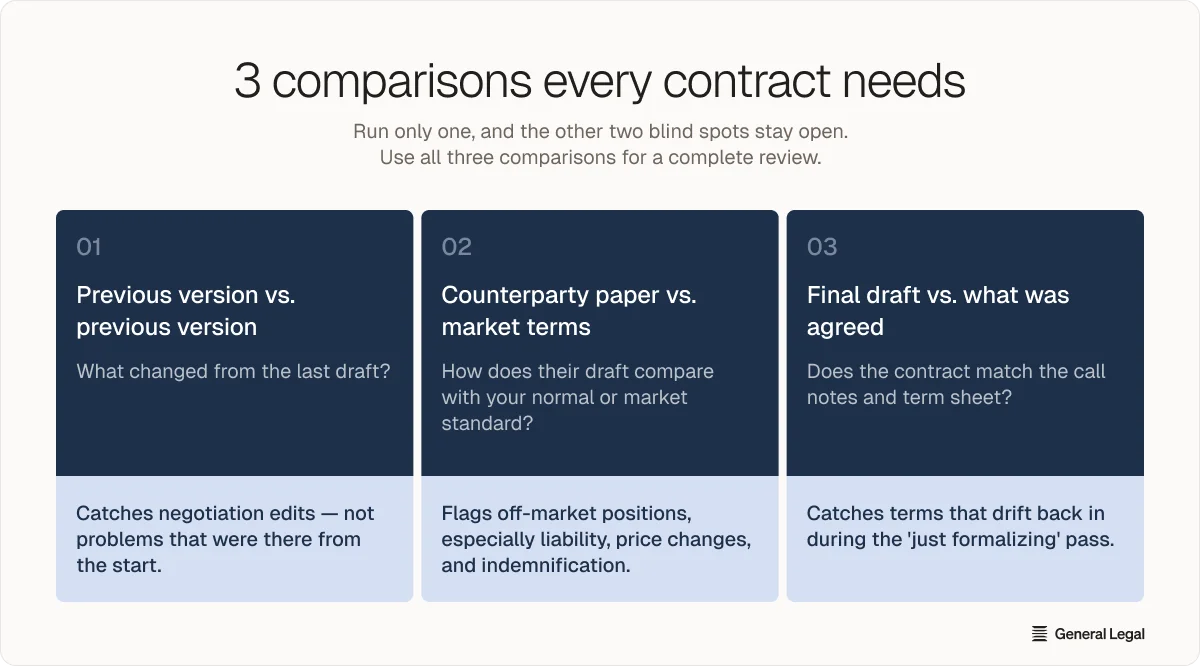
3 comparisons you should run every time
Each comparison below catches a different failure mode, and if you run just one, you leave the other two blind spots open.
1. Current version against the previous version
The most straightforward check is what changed between this draft and the last one you sent. This is the comparison people typically run, and it catches edits introduced during negotiation. However, it doesn’t catch details that were wrong from the start, because the baseline is the other side's earlier draft.
2. Counterparty paper against market terms
A vendor's standard MSA is standard for them, drafted in their favor. But how does what they sent compare with what you'd normally accept, or with what's standard in your industry?
If the main contract terms, such as limitation of liability, price changes, and indemnification, are untouched in a vendor's first draft, you should treat it as an opening position, not agreement.
3. Final draft against what was actually agreed
Did the document reflect what both sides agreed on the call, or did something drift back in during the "just formalizing" pass? This is the comparison almost nobody runs, and it's where verbal agreements tend to end. Check the final against your own notes and the term sheet, not against the previous draft.
How to run a redline that catches things
Before you sign anything with more than one draft in its history, you need a clean, tool-generated blackline, not a careful read.
"Minor edits" is where risk hides. A vendor doesn't need to rewrite your liability clause to harm you. All they need to do is change "will" to "may," delete one carve-out, or extend a notice period from 30 to 90 days. On a commercial contract that runs for years, one of those is worth more than the whole negotiation over price.
The mechanics that matter:
- Compare against the immediately prior version: Not against the original. Drift compounds, and a v1-to-v7 difference is unreadable.
- Use dedicated tooling, not a side-by-side read: Human eyes miss single-word swaps, especially in dense indemnification and liability prose where the stakes are highest and the writing is driest.
- Treat every unexplained change as a question: This includes punctuation. If the other side can't say why something moved, that's information.
- Compare the exhibits and schedules too: Pricing tables, SLAs, and data-processing terms live there, and they're the attachments people forget to compare.
Keep in mind that a clean comparison tells you what changed, but it doesn't always tell you whether that change matters.
Read more: Contract Review Cost: Pricing, Cost Drivers & Savings
7 details to check in every contract version
These terms deserve a pass every time, whether or not they're new in this draft:
1. Liability caps: Is liability capped, and at what: fees paid, a multiple of fees, or something else entirely? A cap that quietly disappeared between drafts is the single most common serious change, and it’s the easiest to miss.
2. Indemnification: Who indemnifies whom, for what, and is it mutual? One-directional indemnities covering the other side's own negligence are standard in vendor paper until someone pushes back.
3. IP ownership: Who owns work product, derivatives, and pre-existing IP brought into the engagement? Check that background IP stays yours and that assignment language is present tense.
4. Data rights: Who can use, retain, or train on data exchanged under the agreement, and for how long after termination? Check this against the DPA as well as the main body. Training rights are the clause most likely to be new in a contract you last signed two years ago.
5. Termination rights: Can you exit, on what notice, and does termination trigger a penalty or wind-down obligation? Compare the exit rights against the term length you thought you negotiated.
6. Auto-renewal: Does it renew automatically, and what's the notice window? A 90-day window on a 12-month term means the decision point arrives nine months in, long before anyone is thinking about it.
7. Governing law and venue: Whose home turf hosts a dispute? This one is often genuinely negotiable and rarely asked about.
Not every unfavorable term on that list is worth stopping a deal over.
Red flags vs. negotiation noise
A contract entirely in your favor means either you're not negotiating with a professional or you're about to lose the deal.
The test isn't whether a term favors them but whether it creates asymmetric, hard-to-reverse exposure for you. A cap that vanished between drafts is a red flag, and it's exactly what a version-to-version comparison exists to catch.
Where software stops, and lawyers start
A tool can flag an unusually broad indemnification clause, but it cannot tell you whether accepting that exposure is the right call for a Series A company trying to close a major enterprise customer this quarter. That judgment weighs legal risk against commercial urgency, and it isn't software’s job.
This is where a professional review actually fits in, as nobody translates the difference into a decision. The good news is that you don't have to choose between the two.
General Legal: Turning a redline into a decision
The model worth looking for runs both halves in sequence:
- Software handles the mechanical pass, which it does faster and more consistently than any person.
- A lawyer handles the call about what the findings mean for this deal, which no tool does.
General Legal is an AI-native law firm rather than a legal-tech product. AI agents triage the document, flag risk, and summarise issues on the first pass. US-barred attorneys then make the judgment calls and deliver an execution-ready redline.
The result is a decision you can act on, not a list of flagged clauses you still have to interpret.
Turnaround is measured in hours rather than the days-to-weeks cycle, and you work with your attorney over Slack instead of an email chain. Our client base is weighted toward B2B startups, from two-person YC companies to growth-stage names. Pricing is published in full.
If you're sitting on a v7 you don't trust, create a free account and send it over, or book a 10-minute working session to walk through how your team currently handles comparison.
- Comparing contracts means checking against three reference points: the previous version, market-standard terms, and what was actually agreed verbally or in writing.
- Single-word changes in dense liability or indemnification clauses can create more risk than entire sections, making tool-generated redlines essential over manual reading.
- Seven critical terms warrant review in every draft: liability caps, indemnification direction, IP ownership, data rights, termination conditions, auto-renewal windows, and governing law.
- Red flags create asymmetric exposure you cannot easily reverse, while negotiation noise reflects normal give-and-take that does not fundamentally shift risk.
- Software identifies changes and flags risk consistently, but deciding whether flagged terms are acceptable for your specific commercial context requires professional legal judgment.
| Three essential comparisons | Check current against previous version, counterparty paper against market terms, and final draft against what was actually agreed. |
|---|---|
| Tool-generated redlines catch what reading misses | Human eyes miss single-word swaps in liability clauses where stakes are highest; dedicated comparison tools are essential. |
| Seven terms to check every time | Liability caps, indemnification, IP ownership, data rights, termination rights, auto-renewal, and governing law deserve review in every version. |
| Red flags vs. normal negotiation | Uncapped liability, missing termination rights, and buried auto-renewal windows are red flags; minor payment or notice shifts are negotiation noise. |
| Where software stops | Tools flag issues consistently but cannot weigh legal risk against commercial urgency for your specific deal stage and context. |
| AI-assisted professional review | AI agents triage and flag risk mechanically, while US-barred attorneys make judgment calls and deliver execution-ready redlines in hours. |
What is the best free document comparison software?
Microsoft Word's built-in Compare feature, under the Review tab, is the most widely available free option and produces a standard blackline of insertions, deletions, and formatting changes. Adobe Acrobat's compare function works if your documents are already PDFs, though full functionality needs a paid subscription.
How do you compare two versions of a contract?
Open both versions in a comparison tool, generate a blackline against the immediately prior version rather than the original, and read the output clause by clause rather than skimming the change bar. Then check the difference against your own negotiation notes, since a change agreed verbally and a change that appeared unannounced can look identical.
What is a red flag in a contract?
A red flag is a term creating asymmetric, hard-to-reverse exposure, as opposed to normal give-and-take. The clearest examples are uncapped or one-sided liability, indemnities broad enough to reach unrelated third-party claims, auto-renewal with a buried notice window, and vague acceptance criteria the other side can claim breach against.
Can AI review a contract?
AI reviews contracts well at the identification layer, flagging clauses, spotting changes between versions, and checking a document against a playbook faster and more consistently than a person. It doesn't decide whether a flagged risk is acceptable for your specific deal, and its output doesn't carry attorney-client privilege, which is among the known limits of AI in legal work and a reason why AI-assisted review still ends with a lawyer.
How often should contracts be compared?
They should be compared every time there is a change, on any agreement with more than one draft in its history. The comparison that catches a reinserted clause is the one run against the draft immediately before it, so skipping a round leaves a gap that later checks won't surface.
- Commercial Terms vs. Legal Terms: 5 Key DifferencesCompare commercial terms vs legal terms so you can understand key differences, spot risks, and protect your interests before signing a contract.
- What Should Be Included in a Commercial Contract: 15 ClausesLearn what should be included in a commercial contract so you can define key terms, manage risks, and protect your interests.
- The Ultimate Commercial Contract Checklist for 2026: What to Review Before SigningDiscover the ultimate commercial contract checklist so you can review key terms, spot risks, and protect your business.