
Claude’s footprint in law is expanding fast.
From Thomson Reuters and Harvey to Legora and law firms building agentic workflows with Anthropic, the industry is betting big on this technology and its potential to change how legal work gets done.
The momentum accelerated on May 12, 2026, when Anthropic expanded its legal offering with 12 practice-area plugins and more than 20 MCP (Model Context Protocol) connectors. These link Claude to the tools legal professionals already use, including document management, legal research, e-discovery, and contract management systems, while allowing teams to customize workflows to fit their existing processes.
Together, these plugins and connectors are known as Claude for Legal—not a separate product, but a set of open-source add-ons that run on a paid Claude plan.
But how far can your team go with these legal capabilities?
This guide breaks down what Claude can (and can’t) do in legal practice.
Claude for Legal: 16 ways it can help your team
With the May 12 plugins and connectors, Claude can help your team with at least 16 legal tasks.
Most of these tasks map to Anthropic’s 12 practice-area plugins, published in its open-source Claude for Legal repository. The rest rely on Claude’s general capabilities and connectors.
1. It can review and redline contracts against your playbook
Give Claude a vendor agreement or NDA alongside your team’s contract playbook, and it will:
- Compare clauses against approved positions
- Flag deviations in liability, indemnification, payment terms, and termination rights
- Suggest fallback language
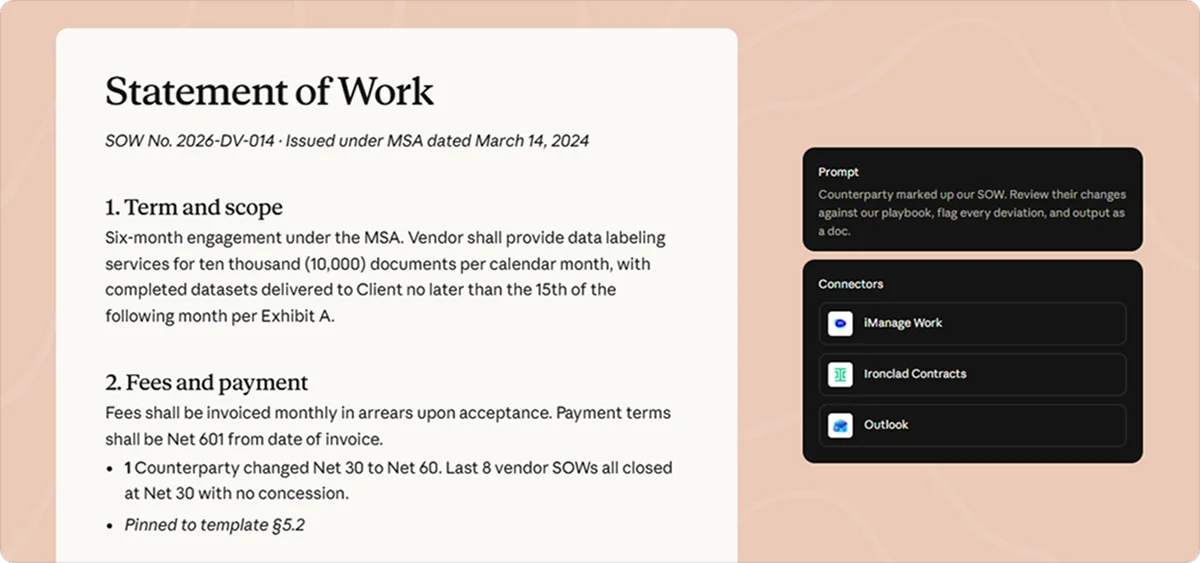
With the Claude for Word add-in, it can also produce tracked changes and margin comments explaining the proposed edits.
For in-house counsel handling a steady stream of counterparty paper, this capability speeds up first-pass review and leaves more time for negotiation strategy.
Read more: The Most Common NDA Pitfall Isn’t What You Think
2. It can draft contracts and help prepare for negotiations
From an initial NDA to a statement of work, Claude can draft agreements using your templates, precedents, and preferred clauses. It can also:
- Compare a counterparty’s draft with your fallback positions
- Explain the commercial implications of proposed changes
- Turn its findings into a negotiation plan
The result is a stronger starting point for routine deals, particularly for lean legal teams supporting fast-moving sales and procurement functions.
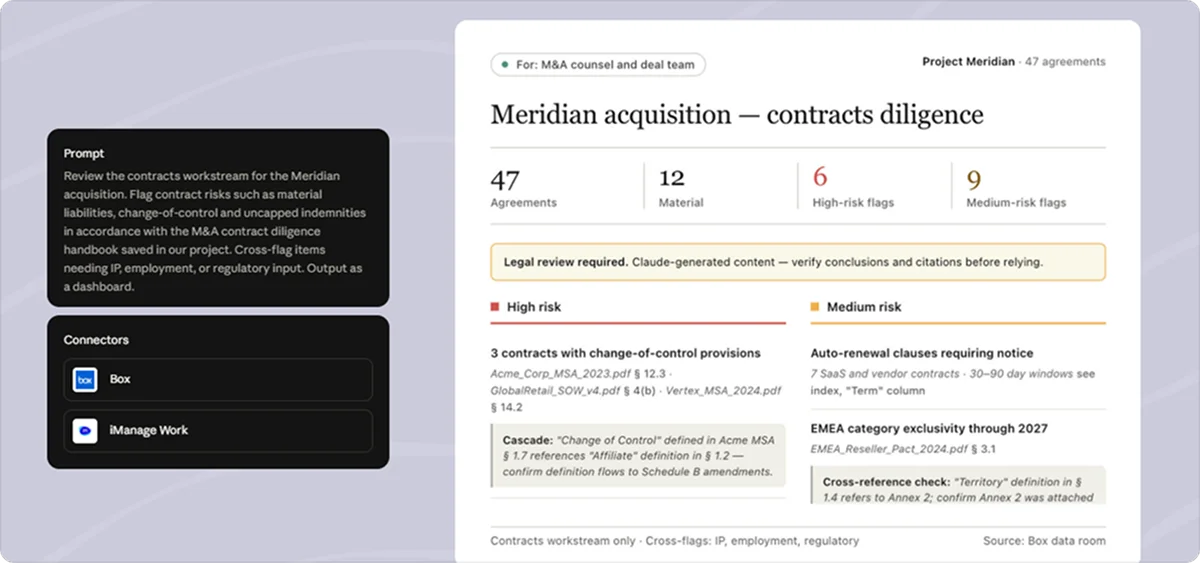
3. It can conduct M&A due diligence and review transaction documents
During an acquisition, legal teams must review contracts, corporate records, and other transaction documents to identify risks that could affect the deal.
Claude can help process these materials, flag issues like uncapped indemnities, material liabilities, and change-of-control provisions, and prepare diligence summaries.
It can also cross-reference findings that require input from IP, employment, or regulatory counsel and help prepare disclosure schedules, board consents, and closing checklists.
4. It can analyze discovery documents and build case chronologies
When a matter involves hundreds or thousands of records, Claude can synthesize information across documents rather than treating each file in isolation. It can then:
- Extract relevant emails and passages
- Identify recurring themes
- Organize events chronologically
- Produce summaries for the case team
In addition, with connectors for platforms like Everlaw and Relativity, you can retrieve material by keyword, metadata, or document type.
Thanks to these capabilities, litigation teams can spend less time sorting through the record and more time evaluating evidence, inconsistencies, and case strategy.
5. It can draft litigation documents and help prepare for depositions
For litigation, Claude can draft briefs, motions, witness summaries, and deposition questions based on case materials and firm templates. It can also review expert reports, analyze pleadings, flag citations for verification, and organize documents for privilege logs.
This gives litigators a head start on document-heavy tasks while leaving legal strategy and final review to counsel.
6. It can monitor regulatory changes and flag compliance risks
New regulations and guidance can affect several business functions at once.
Claude can help catch compliance gaps earlier by:
- Monitoring developments
- Filtering them against your team’s materiality thresholds
- Comparing requirements with internal policies
- Flagging gaps or upcoming comment deadlines
With access to relevant regulatory sources, it can also check contract language against frameworks like GDPR or CCPA and produce structured findings.
7. It can research case law and draft legal memos
Legal research connectors can bring case law, court filings, and authoritative legal materials into Claude’s workflow. This can aid your research and written analysis by:
- Identifying relevant authorities
- Summarizing holdings and regulatory guidance
- Organizing arguments
- Turning research into a structured memo with citations for verification
If you’re preparing legal updates for non-lawyer stakeholders, Claude can also translate dense statutory language into plain English.
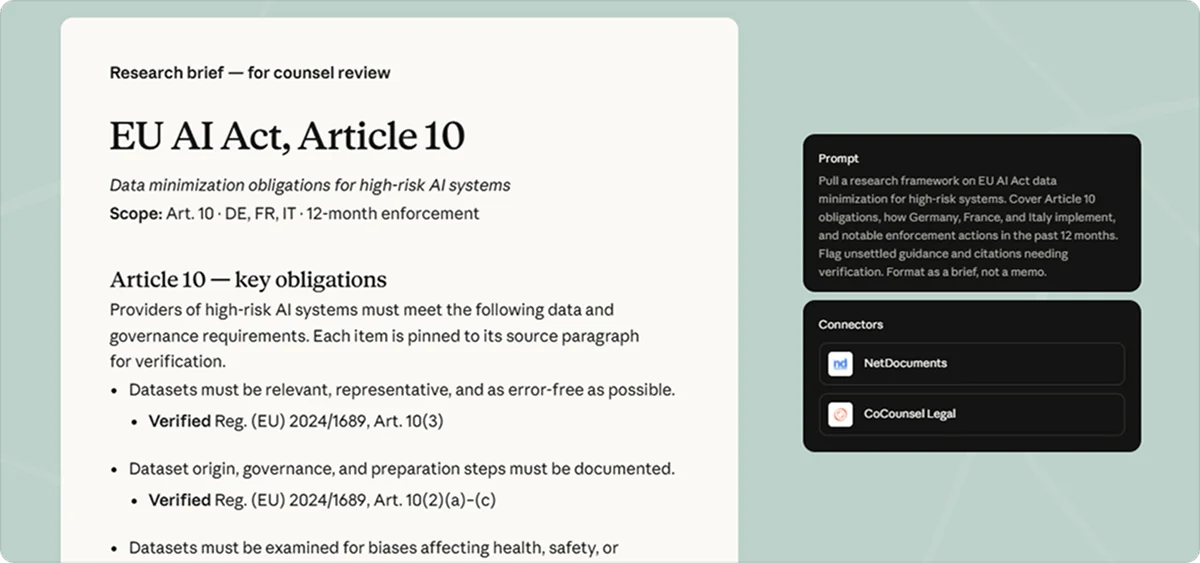
8. It can prepare privacy assessments and help respond to data requests
Previous privacy assessments provide a useful foundation for the next one. Claude can use existing PIAs (Privacy Impact Assessments) and DPIAs (Data Protection Impact Assessments), internal templates, and team instructions to draft new assessments.
Additionally, it can:
- Review data processing agreements against your playbook
- Prepare draft responses to DSARs (Data Subject Access Requests)
- Track statutory timelines
- Flag differences between written privacy policies and actual practices
Privacy counsel can reuse established work and focus on substantive questions about data handling, risk, and remediation rather than rebuilding documents from scratch.
9. It can review marketing content and product launches for legal risks
Before a campaign or feature goes live, Claude can check the relevant copy and product materials against your internal review framework. This review can flag issues like:
- Unsupported marketing claims
- Questionable statistics
- Publicity rights concerns
- Missing trademark symbols
Claude can then suggest corrections and assign preliminary risk levels, giving marketing and product teams earlier feedback and helping counsel concentrate on issues that need a lawyer’s judgment.
10. It can review employment agreements and identify state-specific requirements
Offer letters, non-competes, severance agreements, and employment policies often raise different issues depending on the state involved.
Claude can review these documents against jurisdiction-specific requirements, flag provisions that may be unenforceable, and help draft policies covering hiring, termination, worker classification, leave, and investigations.
11. It can support trademark clearance and patent reviews
IP work often requires lawyers to connect technical evidence with legal questions.
Claude can help trace that connection, from screening trademarks and conducting preliminary freedom-to-operate reviews to mapping patent claims against technical disclosures and searching patent literature.
For the work that follows, it can support:
- Invention disclosures
- Patent drafting
- Cease-and-desist letters
- DMCA takedowns
- Open-source compliance reviews
These features give IP counsel a faster way to organize evidence and prepare for clearance, infringement, and validity assessments.
12. It can prepare board materials and support corporate governance
Board materials need to give directors a clear view of the issues, risks, and decisions requiring their attention.
Claude can pull together relevant company records and precedents to draft board memos and board consents. It can also assist with entity compliance and public company governance workflows.
For corporate legal teams, the value lies in getting routine governance materials into shape faster, with less manual assembly and more time to focus on substantive review.
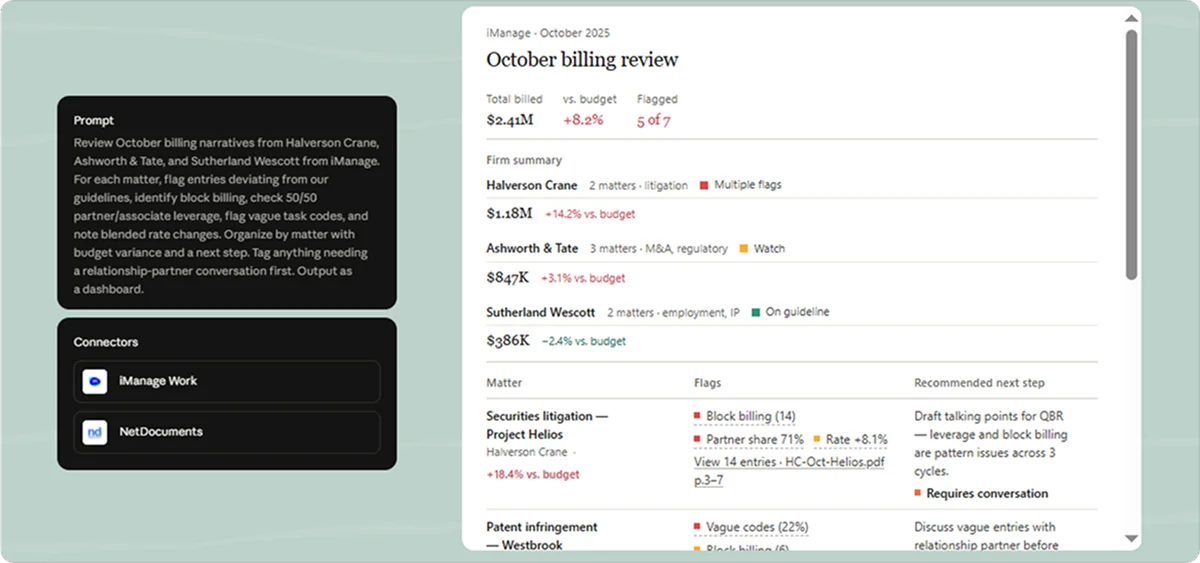
13. It can review outside counsel bills and track matter budgets
Outside counsel invoices can hide billing issues in the detail.
Claude can help audit invoices by surfacing:
- Block billing
- Vague task codes
- Unusual partner-to-associate ratios
- Rate increases
- Entries that fall outside billing guidelines
Cross-checking invoices against matter budgets can also reveal spending variances and group exceptions by matter, with suggested follow-up actions.
As a result, invoice review becomes more systematic, while teams receive specific evidence to challenge questionable charges.
Read more: Commercial Legal Expenses: What They Cost and How to Budget for Them
14. It can help manage legal intake, matters, and deadlines
Legal intake gets messy when requests are scattered across email, Slack, and business systems.
With access to tools like Outlook and matter management platforms, Claude can:
- Sort incoming requests
- Identify contract reviews
- Draft initial replies
- Schedule follow-ups
- Keep matter information organized
It can also help track legal holds, demand letters, subpoenas, deposition preparation, and other tasks with critical deadlines.
A more structured intake process helps legal teams maintain visibility across their workload and reduces the risk of requests or deadlines being overlooked.
15. It can assess AI use cases and support AI governance
When a business team proposes a new AI tool, legal needs to understand its purpose, risks, and vendor terms.
Claude can help triage proposed use cases against internal governance tiers, draft impact assessments, review AI vendor contracts, and prepare a first version of an AI policy. Its findings can then be organized against the company’s existing risk framework for governance and attorney review.
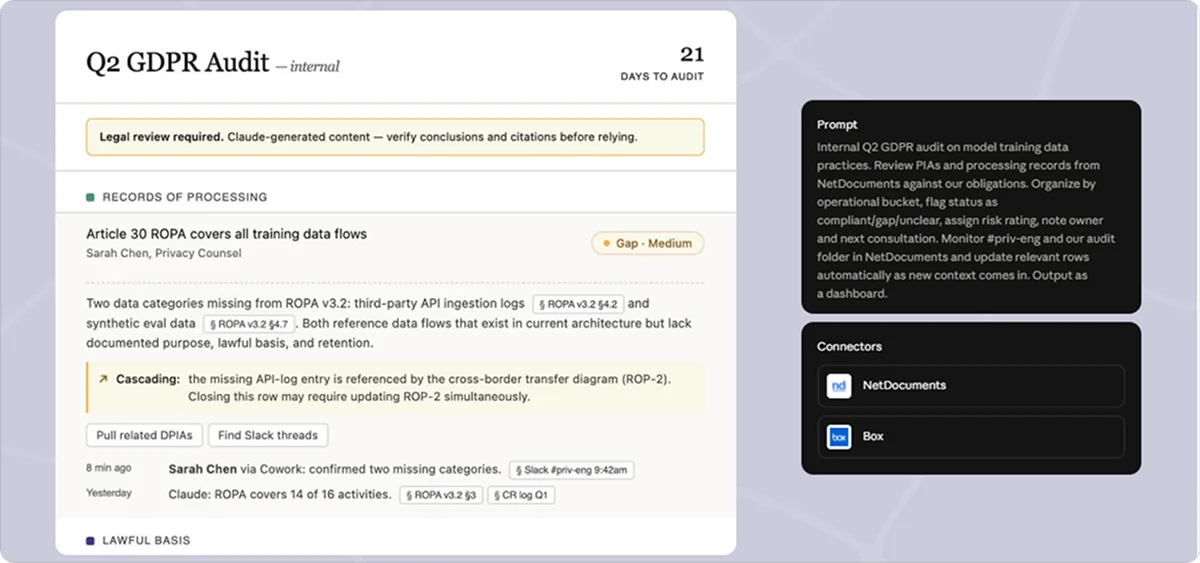
16. It can help prepare audit responses and identify compliance gaps
Point Claude Cowork at a folder of policies, procedures, contracts, evidence files, and audit requirements, and it will:
- Categorize documents against the relevant control framework
- Identify missing evidence
- Rename and organize files
- Produce a control matrix with potential gaps and preliminary risk ratings
- Prepare policy summaries for auditor walkthroughs
Afterward, compliance teams get a more structured audit package and can direct their attention to missing documentation and controls that need investigation or remediation.
As these examples show, Claude can take on a meaningful share of legal work, but many of its contributions are only a first step. It still has limits that legal teams need to understand before deciding where and how to rely on it.
Claude for Legal: 7 limitations your team needs to know
Claude can accelerate legal work, but its output still has to withstand the same scrutiny as any other legal work product. These seven limitations show where this technology can fall short.
1. It can’t replace legal judgment or take responsibility for legal outcomes
Claude can surface risks, compare contract language against a playbook, and outline legal arguments. However, it can’t decide how much risk a business should accept, weigh competing client interests, or take professional responsibility for the advice.
Those decisions remain with counsel, who must understand the matter and assess the output before anyone acts on it.
2. It can’t guarantee accurate legal research or citations
A polished memo can still contain incorrect citations, misstate a holding, or omit a controlling authority.
While Claude can help identify relevant cases and summarize legal materials, lawyers need to verify the cited sources, confirm that they support the proposition, and check that the law remains applicable.
The same applies to dates, quotations, and document references in litigation work.
3. It can’t reliably identify every issue in a contract or legal document
Claude can miss contractual rights when it relies on keyword searches instead of reading the provision in context.
In an anecdote shared on LinkedIn, a lawyer reported that Claude missed a termination-at-will right because the contract used different wording from the phrase Claude searched for.
Since not finding a keyword doesn’t establish that a right or obligation is absent, counsel should ensure the full document has been reviewed and independently check material clauses before relying on the result.
4. It can’t interpret legal language without context or jurisdictional verification
Legal meaning depends on more than the words on the page.
A provision may turn on the surrounding agreement, the facts of the transaction, governing law, or jurisdiction-specific rules.
Claude can explain statutory language and compare requirements across jurisdictions when given the right context, but it can still miss a relevant distinction or apply the wrong legal framework. That’s why you should always specify the governing jurisdiction and factual background, then verify the analysis against authoritative sources.
5. It can’t guarantee complete or unbiased analysis
Claude’s response is shaped by the documents, instructions, and assumptions it receives.
If the source material is incomplete or the prompt frames the issue too narrowly, its analysis may overlook relevant evidence or give disproportionate weight to one interpretation.
A solution is to ask it to test competing arguments and identify uncertainty. Still, you shouldn’t treat a structured report or risk score as proof that every material issue has been found.
6. It can’t protect privileged or confidential information without the right safeguards
Before entering client information into Claude, legal teams should understand how their account handles data, who can access it, and what confidentiality protections apply.
Individual tools have their own gaps, too: Anthropic’s documentation notes that Claude for Word activity isn’t included in Enterprise audit logs or the Compliance API.
The 2026 ruling in United States v. Heppner illustrates why this matters: A federal court found that a criminal defendant’s exchanges with the consumer version of Claude, which he used on his own rather than at his lawyer’s direction, weren’t protected by attorney-client privilege or the work-product doctrine.
The ruling left open whether counsel-directed use of an enterprise platform with strong confidentiality terms would be treated differently. Until courts say more, set clear policies on what information employees can enter into AI tools and which platforms are approved for sensitive work.
7. It can’t ensure compliance simply by identifying potential risks
Claude can compare contracts and policies against a specified framework, flag gaps, and prepare compliance findings.
However, identifying a problem is only one step toward resolving it.
Teams still need to determine whether the finding is legally significant, decide what remediation is required, assign responsibility, and confirm that corrective action has been completed.
The common thread across all these limitations is that lawyers still need to review the work, apply their judgment, and stand behind the advice.
However, for startups without in-house counsel and growing companies with lean legal teams, building an internal function to oversee AI-generated legal work may not make sense.
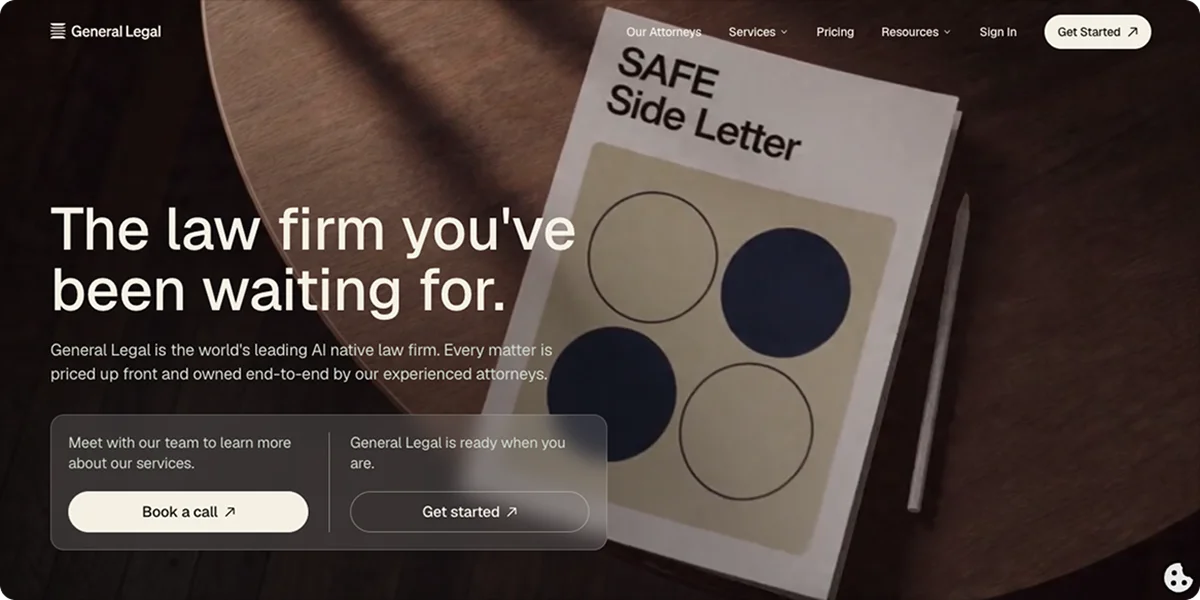
For these companies, an AI-native law firm like General Legal offers another path.
How General Legal combines AI speed with lawyer accountability
Claude gives teams access to AI capabilities across contract review, legal research, compliance, and other workflows. General Legal uses AI throughout its own legal workflows, with its proprietary Sentinel AI handling the initial contract review.
The difference is who takes responsibility for the result.
With an AI assistant like Claude, even if it’s built for the legal industry, your team still needs someone qualified to verify the output and turn it into reliable legal advice. With General Legal, that work is part of the service.
The attorneys review Sentinel’s findings and proposed redlines against the full agreement, applying their legal expertise and understanding of the client’s commercial objectives, negotiating position, and risk tolerance. General Legal’s team includes experienced attorneys who bring legal judgment and practical business perspective to the work, so clients receive a reviewed contract and advice tailored to the deal in front of them.
Working with a law firm also doesn’t have to mean waiting weeks for a redline or guessing what the final bill will be.
General Legal reports a median first turn of three hours or less on commercial work, offers upfront flat-fee pricing, and gives clients direct access to their attorneys through Slack, email, or its client portal.
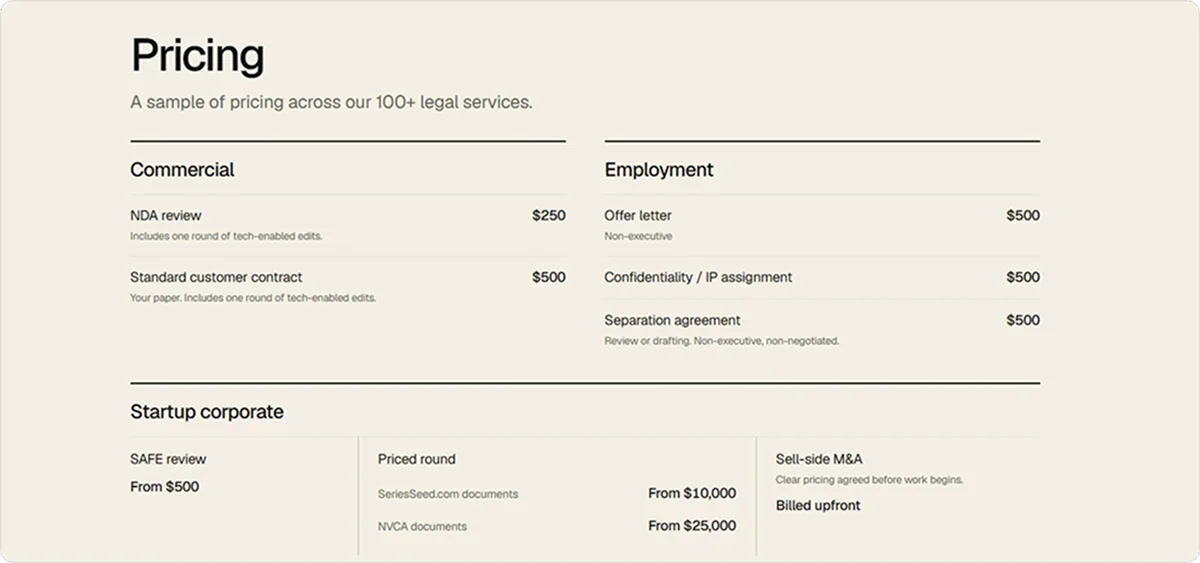
Beyond contract review, General Legal can help with a broad range of commercial legal needs, including:
- Contract drafting and negotiation
- Corporate and startup counsel
- Privacy and data protection
- Employment law
- Intellectual property
- Regulatory compliance
Across all these services, clients work directly with experienced attorneys who use AI to streamline the work while retaining responsibility for the legal analysis and advice.
If this sounds like the kind of legal support your company needs, book an introductory call with our lawyers or open a matter right away to receive a flat-fee quote. There are no upfront fees or commitments to create an account.
- Claude for Legal is a set of open-source plugins and connectors, announced by Anthropic on May 12, 2026, that runs on a paid Claude plan rather than being a separate product.
- The article describes 16 legal tasks Claude can support, including contract redlining, M&A due diligence, discovery analysis, regulatory monitoring, privacy assessments, and outside counsel bill review.
- Claude can speed up first-pass work and give teams a head start, but much of its output is only a first step that counsel must review.
- Its limits include unreliable citations, missed contract issues when it relies on keyword searches, and no ability to take responsibility for legal outcomes.
- Confidentiality needs careful handling: a 2026 federal ruling, United States v. Heppner, found a defendant’s use of consumer Claude wasn’t protected by privilege or work-product doctrine.
- Startups and lean teams without in-house counsel may prefer a law firm like General Legal, where attorneys verify AI output and stand behind the advice.
| What it is | Claude for Legal is a set of 12 practice-area plugins and more than 20 MCP connectors that run on a paid Claude plan and link Claude to tools legal teams already use. |
|---|---|
| Contracts | Claude can review and redline contracts against a playbook, draft agreements from templates, and prepare negotiation plans. |
| Deals and disputes | It can support M&A due diligence, analyze discovery documents, build case chronologies, and draft briefs, motions, and deposition questions. |
| Compliance and privacy | It can monitor regulatory changes, check contracts against frameworks like GDPR or CCPA, prepare privacy assessments, and help respond to data requests. |
| Operations and IP | It can review outside counsel bills, manage legal intake and deadlines, support trademark and patent work, and prepare board materials. |
| Accuracy limits | Claude can’t guarantee correct research or citations, and it may miss contract rights when it relies on keyword searches instead of reading in context. |
| Judgment and context | It can’t replace legal judgment, take professional responsibility, or interpret language without the right jurisdiction and facts. |
| Confidentiality | Teams need clear policies and approved platforms for sensitive data, since Claude for Word activity isn’t in Enterprise audit logs and Heppner left key questions open. |
| Alternative | General Legal pairs its Sentinel AI with attorney review, a median first turn of three hours or less, and flat-fee pricing. |
Can Claude AI be used for legal drafting?
Yes. Claude can draft agreements, memos, and litigation documents from your templates and instructions, but a licensed attorney should review the output, and sensitive matters should run on an account with appropriate confidentiality terms.
Is Claude AI good for legal?
Claude AI is good for first-pass contract analysis, legal drafting, and research synthesis, but it requires strict human supervision and proper enterprise configuration to protect confidentiality.
Is Claude for Legal free?
As of November 2026, the code for Anthropic’s Claude legal plugins is free and open source under the Apache 2.0 license, but running them requires a paid Claude subscription.
How can I use Claude for Legal?
Use it to summarize documents, compare contract clauses, draft language, research legal issues, and flag potential risks. Make sure to always provide relevant context and verify the results.
How to use Claude for contract review?
Upload the agreement with your contract playbook, tell Claude which side you represent and which law governs the contract, and ask it to compare each clause against your approved positions. A lawyer should then check the flagged deviations, read the full agreement for anything Claude missed, and approve any redlines before they go to the counterparty.
How does Claude compare with other legal AI tools?
Comparing Claude vs. legal AI tools like Harvey or Legora mostly comes down to setup. Claude is a general-purpose assistant your team configures with plugins, connectors, and playbooks, while dedicated legal AI platforms come with legal workflows built in. With either option, the output still needs attorney review.
- 7 Best Ontra Alternatives for Contract Automation [Compared]Discover the best Ontra alternatives so you can compare contract solutions, find the right fit, and streamline legal workflows.
- 9 Best Legal Tech Companies for Contract Solutions [Comparison]Discover the best legal tech companies for contract solutions so you can compare features, workflows, and services.
- 7 Leading Contract Automation Tools for Legal Teams in 2026Discover leading contract automation tools for legal teams so you can compare features, workflows & solutions that fit your needs.